Well, I finally published my first novel, and what a humbling experience it has been!
Getting my book up on Amazon turned out to be quite the (mis)adventure. It turns out that a great many things have changed in the Indie market since I last looked at it 5 years ago when I started to work on my book.
The Kindle component of Amazon is only run through the US Amazon website (e.g., Amazon.com), although books can be posted from there on the subsidiary sites (e.g., Amazon.ca). In order to even begin the process of uploading an epub, they require that you get an improved 2-step validation process. You must download a special Amazon app on your phone in order to receive a validation number from Amazon. The problem with that for me is that the Newcastle Ridge cell tower has been out most of the winter, and our cell phone hardly ever works anymore. I’ve had real problems with any of my accounts that have sent validation codes via text, and have had to switch over to receiving validation by email. Unfortunately, Amazon.com doesn’t use emails for validation. If you don’t have a cell phone (or it’s broken), they suggest using a Chrome plugin that connects with Amazon to generate the number. The suggested plugin didn’t work (ha, ha). Eventually, I found an open source plugin for Edge from Github that did the job. Step One was finally completed … I was validated!
Of course, Amazon didn’t believe I was really me. I had to send them a photo of my driver’s license to verify my identity. They provided a system whereby the webcam on my computer was supposed to take a picture of my driver’s license, which their computers would scan to determine if it was acceptable. Well, that system didn’t work either. Eventually, I had to get Ken to set up his new, high resolution camera with a tripod to photograph my id in sufficient detail that Amazon would accept it. OK, Step Two was completed … my identity was verified!
Now, I had to set up a direct deposit account with my bank so that Amazon could pay me royalties, should I ever sell a book. This required a bunch of banking info from me, then Amazon had to deposit $0.01 in my account to confirm that it really existed (as you can guess, this is starting to take days rather than hours to complete). So, by the next day, Step Three has been completed … my bank account was confirmed.
Finally, I uploaded my ebook and a cover. Since I had already used their “Kindle Previewer” program to confirm that my epub was correctly formatted, the upload went smoothly (the only part of this process that did). However, Amazon now had to confirm that I had copyright to my novel (and another day passed). Step Four was over … I did indeed have copyright.
At last, I got on with the final step, setting up an Amazon author page. As it turns out, this has been completely changed … they don’t allow links to my blog site or webpage anymore, no additional art or photos, so there is no real hope of getting people interested in my novel. Thankfully, I had already chosen not to DRM my epub file or enroll in any of the Amazon “advertising programs”, so I can take the book off Amazon any time I like.
So, here is the Amazon link: Guardians’ Destiny: Ellendrí Chronicles Book 1. I’m forced to charge $0.99 in order to cover Amazon’s fees (apparently, you can no longer offer an epub for free on the Amazon site unless you enroll in Kindle Select, which I am not going to do). However, rather than paying, you can download either the epub or pdf version of the book for free from my website at Guardians’ Destiny – Storytelling. The epub version has no DRM and can be used on any ebook reader.
So far, only a single copy has been sold on Amazon (ha, ha). I’m not sure if that’s because no one is interested, or if the novel has become lost in the “over 80,000” other Science Fiction and Fantasy books carried by Kindle.
As if that wasn’t humbling enough, I posted a link to the book on a couple of sci fi groups on Facebook. Surprising, I received quite a few negative reactions to my cover and not much else (I don’t believe anyone has read the first page yet).
It seems like AI generated covers have become the “thing” these days. Generative AI is now readily available for hobbyists like myself (I even have Stable Diffusion installed on my tiny notebook computer). However, I dislike using generative AI as I feel that the artwork is not really mine, but is a combination of works by various other artists.
One of the things that I have struggled with over the years in designing my artwork is not having a sufficiently powerful computer (CPU, GPU, and RAM) to carry out photorealistic rendering of my models and backgrounds. The result is that I’ve done partial renders using less realistic (and less computationally demanding) renderers, then tried pasting everything together in Photoshop. The end product was somewhat amateurish (although 5 years ago, when I started working on this project, and before AI was used as fully as it is now, this artwork would have been considered more acceptable). So, here was my original cover:
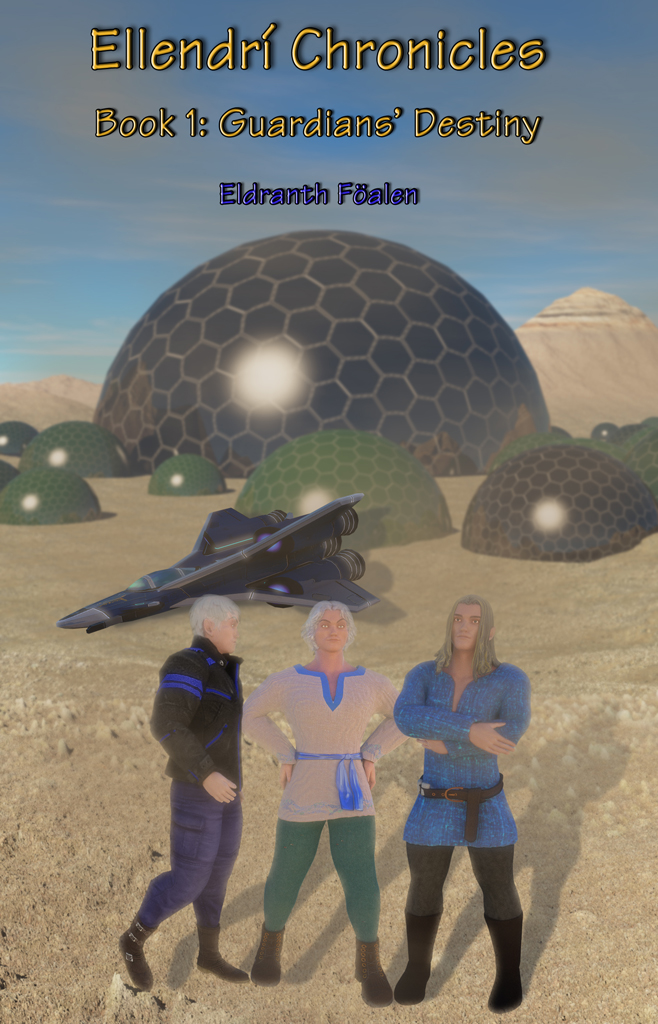
In my efforts to find ways to improve the realism of the rendering of my artwork, I found a new way to use AI. Qwen-image-edit is a model based on Stable Diffusion (and available online through Hugging Face and AI Media Studio) that can be used to edit the artwork I have already created, allowing me to change character poses, recolor specific aspects of a scene (like changing the color of a character’s pants), add special effects to a scene (like a sandstorm), and then re-render my work using a more photorealistic style. All this, and my artwork still remains my own!
For fun, I re-rendered the original background in the cover shown above using Qwen-image-edit:

This render definitely has more depth of field and a much better sandstorm effect that I was able to generate with Photoshop. However, it lacks action, which was one of the criticisms that I had received.
In the end, I created three “new” potential alternative covers for my novel. These covers have resulted from model development in Blender, background generation using Celestia, Terragen, and World Machine, layering and scene organization using Photoshop, and final detailing and rendering using Qwen-image-edit.
The first cover, which turned out to be the one that most people liked the best, was a redesign of my original cover. Here’s how I set it up.
Firstly, I took the Blender rendering of my spaceship model (the Föalen),


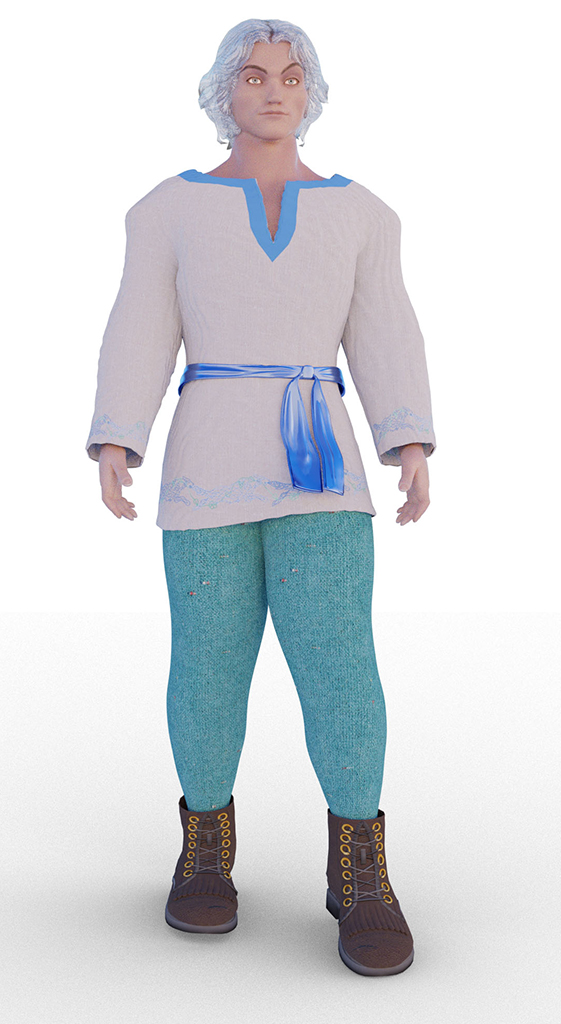
Using Photoshop, I added a Guardian’s Star to the image:
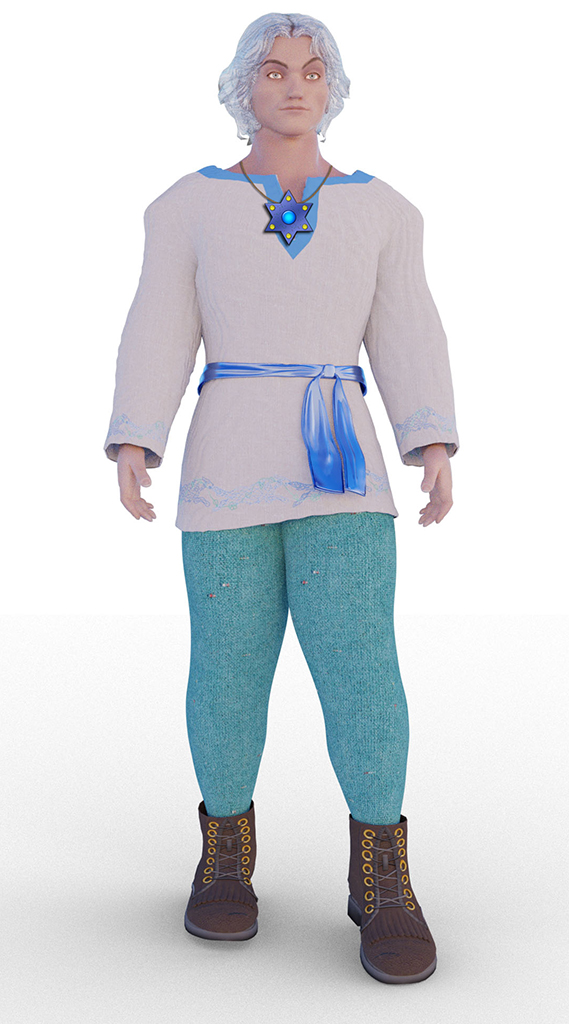
Back to Qwen-image-edit, I changed the color of Eldranth’s pants, put him in a more natural pose (I could have done this with Blender, but it is difficult to create anatomically correct poses in Blender unless you can find a “rigged skeleton” that is exactly what you want), and made the render more photorealistic:

Returning to Photoshop, I did a little more “Photoshopping magic”–flipped the image of Eldranth to face left, added a boot knife to his gear, arranged both Eldranth and the spaceship against my background of Dïarven city, and added a little depth and shadow.

The image layers still don’t blend well and appear “pasted” over the background, which is a typical problem in programs like Photoshop, and is very difficult to overcome.
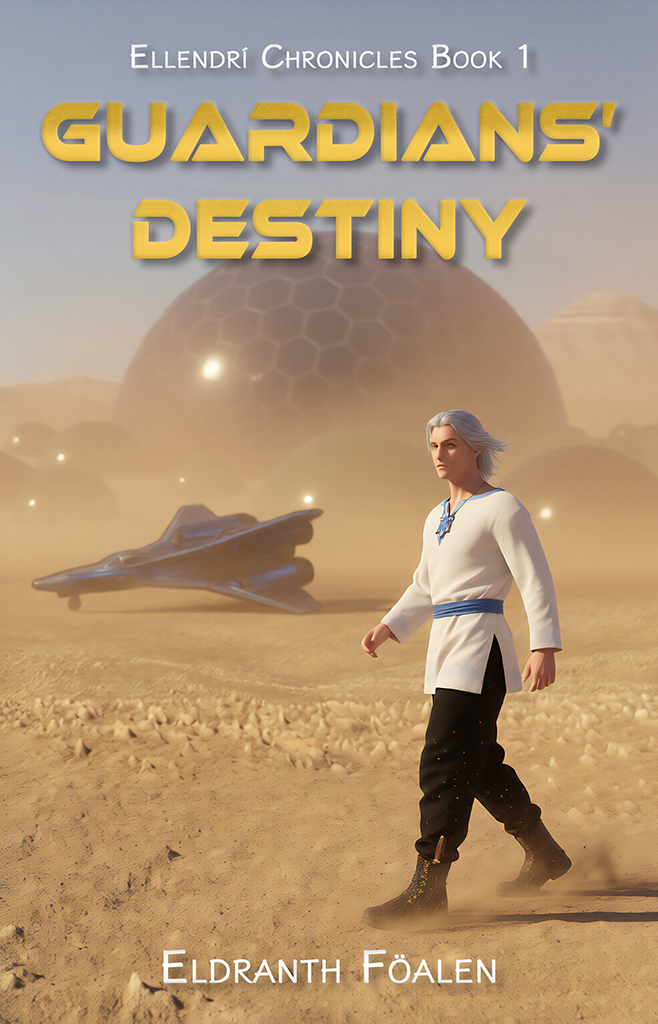
So, back to Qwen-image-edit. After a bit of trial and error, I was able to produce the following render:

The overall content and details of the image have not been changed, but the sense of depth is much better, the sandstorm effect is quite realistic (I was unable to generate a truly realistic sandstorm with Photoshop), shadows and reflections are consistent, and the layers blend together and no longer look “pasted”.
The readability, font style, and font effects on my original cover were also subject to some negative criticism, so I made some significant changes which I hope improve the visibility and feel of the text. The final result was this:
I created two other covers in a similar manner, but with different background themes. Front cover 2 was a more “traditional” sci fi cover,

while front cover 3 was an “abstract” art design.

Neither cover 2 nor cover 3 received particularly good reviews, so I stayed with cover 1.
I have also created a back cover. My first attempt, rendered in Photoshop, looked like this:

Rendering using Qwen-image-edit, and making the font more readable in Photoshop, produced this result:

Definitely a big improvement!
Quite a few people asked about the meaning of the covers … I think the only good answer to that is that you have to read the book to find out!
So, publishing my first novel has definitely been an experience, and maybe not an entirely pleasant one. I’m very glad that I had no real expectations of getting a lot of readers (although I did think maybe one or two people might download a copy just out of curiosity), and that I haven’t had a lot of “ego” involved in the project. It was just something I wanted to do (a bucket list item) and now I have. And I’m really glad that I didn’t choose to write books as a career back in the days when I was thinking of doing just that!
In the end, I find myself asking the following question: In a world where everything seems to be about money, is there a platform where amateurs can respectfully share their works with others without being treated as competition for those who only value their creativity as a source of income?